
HTTP & HTML
How do we communicate with internet?
When we browser in the internet or type in the URL , we are sending a get request from the server to provide information which far away from us.The serve then fetchs the data from its cloud and sends it back.The protocol used for sending the information around is called HTTP(Hyper Text Transfer Protocol).HTTP
HTTP is a protocol which allows the fetching of resources, such as HTML documents. It is the foundation of any data exchange on the Web and it is a client-server protocol, which means requests are initiated by the recipient, usually the Web browser. A complete document is reconstructed from the different sub-documents fetched, for instance text, layout description, images, videos, scripts, and more.
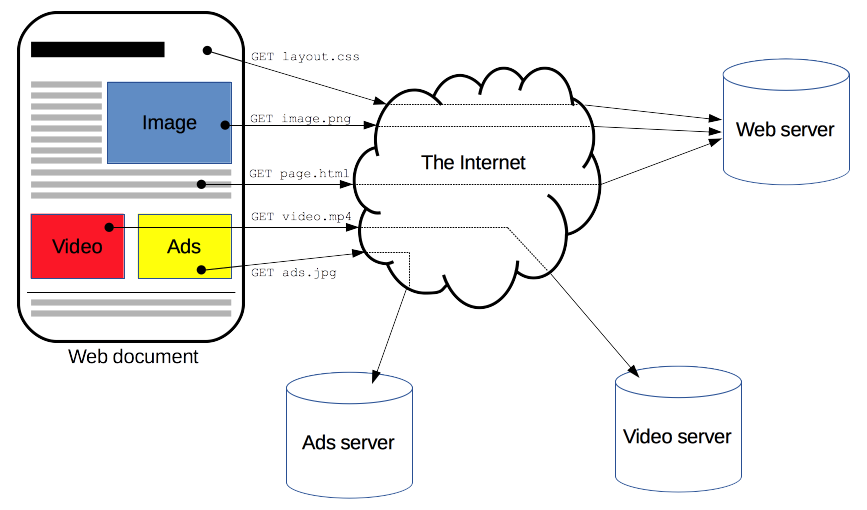
Clients and servers communicate by exchanging individual messages (as opposed to a stream of data). The messages sent by the client, usually a Web browser, are called requests and the messages sent by the server as an answer are called responses.
HTML
When you use Google Chrome, Firefox or some other browser to lookup a Web page, what you see on your monitor is a result of an interaction between your browser and a Web server—the computer that "hosts" the website. Your browser and the Web server talk to each other using a special language called Hypertext Transfer Protocol....HTTP.
What the Web server sends you (after you make your request) is a unique combination of images, text, addresses and special codes for formatting. They come as digital information, often in separate bits and pieces of data, but they manage to come together into a unified page or document.
How does that happen?
Through another amazing and versatile formatting language known as Hypertext Markup Language...or HTML.
In its most basic context, HTML is something like a word processing program on steroids. Before fancy word processing (that allowed italics, bold, underline and different fonts) most messages (in understood languages like English or French) were sent in a plain text format. But over time word processing programs and advancements allowed fancier text development.
HTML, similarly, grew in sophistication over time according to a universal, non-vendor specific system. The HTML codes handled text and, not long afterword, pictures and layout information.
In the html the information is directly put in as text. Where as, Images and Videos are pit in by reference.The image and video is linked my a URL,which is fetched by the server when web page is executed.Each of the image and video sends in separate HTTp request.
In html we not only get information , we also put information. When ever we are filling a form , we are send the information in a post request to the server.The server then saves the details and sends back some cookies. This cookies are stored in our computer.Next time when we send a post request the server exactly knows who we are by the cookies stored in the computer.
SSL/TLS
How can sensitive data like credit cards be transmitted securely over the Internet?
In the early days of the Internet, it was enough to ensure that the network routers and links are in physically secure locations. But as the Internet grew in size, more routers meant more points of vulnerability. Furthermore, with the advent of wireless technologies like WiFi, hackers could intercept packets in the air; it was not enough to just ensure the network hardware was physically safe. The solution to this was encryption and authentication through SSL/TLS.
What is SSL/TLS?
SSL stands for Secured Sockets Layer. TLS stands for Transport Layer Security. SSL was first developed by Netscape in 1994 but a later more secure version was devised and renamed TLS. We will refer to them together as SSL/TLS.
SSL/TLS is an optional layer that sits between the Transport Layer and the Application Layer. It allows secure Internet communication of sensitive information through encryption and authentication.
Encryption means the client can request that the TCP connection to the server be encrypted. This means all messages sent between client and server will be encrypted before breaking it into packets. If hackers intercept these packets, they would not be able to reconstruct the original message.
Authentication means the client can trust that the server is who it claims to be. This protects against man-in-the-middle attacks, which is when a malicious party intercepts the connection between client and server to eavesdrop and tamper with their communication.
We see SSL in action whenever we visit SSL-enabled websites on modern browsers. When the browser requests a web site using the https protocol instead of http, it’s telling the web server it wants an SSL encrypted connection. If the web server supports SSL, a secure encrypted connection is made and we would see a lock icon next to the address bar on the browser.
How does SSL authenticate the identity of a server and encrypt their communication?
It uses asymmetric encryption and SSL certificates.
Asymmetric encryption is an encryption scheme which uses a public key and a private key. These keys are basically just numbers derived from large primes. The private key is used to decrypt data and sign documents. The public key is used to encrypt data and verify signed documents. Unlike symmetric encryption, asymmetric encryption means the ability to encrypt does not automatically confer the ability to decrypt. It does this by using principles in a mathematical branch called number theory.
An SSL certificate is a digital document that consists of a public key assigned to a web server. These SSL certificates are issued to the server by certificate authorities. Operating systems, mobile devices, and browsers come with a database of some certificate authorities so it can verify SSL certificates.
When a client requests an SSL-encrypted connection with a server, the server sends back its SSL certificate.
The client checks that the SSL certificate.
is issued to this server is signed by a trusted certificate authority has not expired. The client then uses the SSL certificate’s public key to encrypt a randomly generated temporary secret key and send it back to the server. Because the server has the corresponding private key, it can decrypt the client’s temporary secret key. Now both client and server know this temporary secret key, so they can both use it to symmetrically encrypt the messages they send to each other. They will discard this temporary secret key after their session is over.
What happens if a hacker intercepts an SSL-encrypted session?
Suppose a hacker intercepted every message sent between the client and the server. The hacker sees the SSL certificate the server sends as well as the client’s encrypted temporary secret key. But because the hacker doesn’t have the private key it can’t decrypt the temporarily secret key. And because it doesn’t have the temporary secret key, it can’t decrypt any of the messages between the client and server.